 EN
EN
In brief: As of 6 October 2026, MatBet provided an Android button on its mobile app page, an option to add the web app to the iPhone home screen through Safari, and access through a mobile browser. On iPhone, follow Share, Add to Home Screen, then Add. On Android, start with the operator's current button; to access without installation, use the mobile site.


APP · ANDROID · IPHONE
How to open MatBet on your phone: Android app and iPhone access
 NOGA · Active•Android · iPhone · browser
APP · MOBILE ACCESS
Key facts

What mobile access options does MatBet offer?
MatBet has separate entry points for Android and iPhone, while its mobile site works in a compatible browser.
The options differ even before you log in: on Android, use the app button; on iPhone, create a site icon through Safari; in a browser, open the mobile page directly.
| Method | Where to start | Action on your phone | When to choose it |
|---|---|---|---|
| Android | “MATBET MOBİL UYGULAMA” page, Android button | Follow the operator's offered route to get the app | When you want the Android option through the operator's current interface |
| iPhone | “iPhone için indir” button | Open Safari and add the site to your home screen | When you prefer a separate icon to launch the mobile interface |
| Mobile site | Current address from a verified operator channel | Open the page in a compatible mobile browser | When you do not want to install an app or add an icon |
Choose based on the action you need. The Android button and an iPhone icon do not imply identical installation steps, system permissions or updates.


MatBet APK: where to start an Android download
Start with the Android button on the official “MATBET MOBİL UYGULAMA” page. This element was visible in the operator's interface on 6 October 2026.
It is the starting point for the Android option. Open it on the phone you intend to use and check the proposed destination before downloading a file.
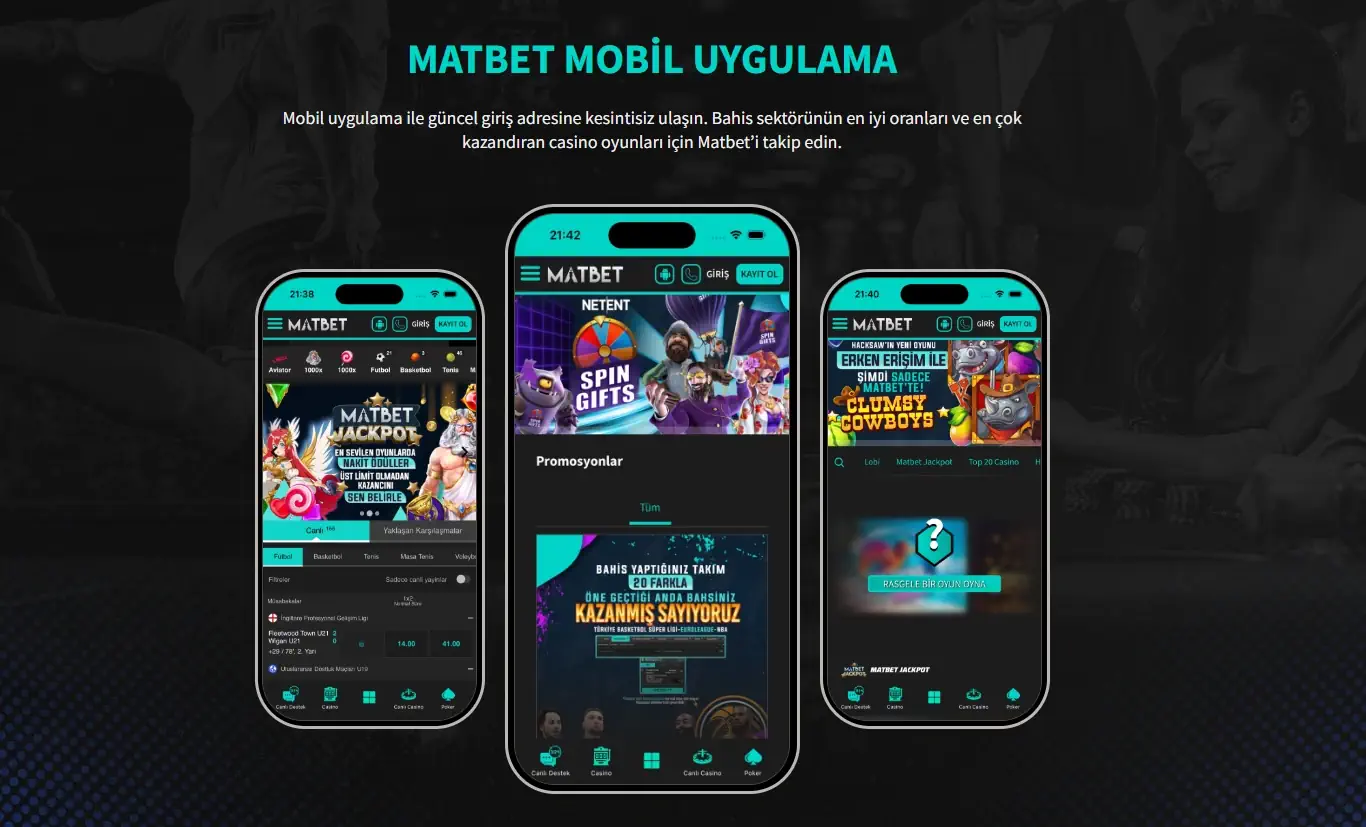
- Get the current address from a verified operator channel.
- Open the mobile app section and find the Android button.
- Tap it and check the destination page or details of the proposed file.
- If the source is doubtful or the system shows a warning, stop and ask support about the route.
An older Android link used the name matbet-release-1.3.1.apk. This is a historical filename; do not choose today's download because its name matches.
When downloading again, return to the current Android element. A saved file or forwarded message may refer to a previous release even if its name looks familiar.
Do not disable your phone's protections just to install. Google Play Protect checks apps and may warn about potentially harmful software; explanations of warnings are in Google's help pages.
If you only need to open the site on your phone, use the browser. Getting an APK is not required for mobile web access.


How to add MatBet to an iPhone home screen
On iPhone, use “iPhone için indir,” then Safari's Share menu and Add to Home Screen. The resulting icon launches MatBet's mobile web interface.
This is a web app accessed through Safari and the home screen. The described steps do not include installing from the Apple App Store.
Five steps from the iPhone button to launch
Adding the icon takes five steps, as shown in the operator's interface on 6 October 2026:
- Tap “iPhone için indir.” When the route opens in Safari, open the Share menu. Continue from the mobile service page you have opened.
- Choose “Ana Ekrana Ekle.” This is the Add to Home Screen command. Do not confuse it with bookmarking the page.
- Tap “Ekle.” On the next screen, this button confirms adding the icon. First check that it is the page you want.
- Find the MatBet icon on your iPhone home screen. Its appearance means the addition is complete; you do not need the app store for this action.
- Open the icon. It launches the service's mobile interface. Continue with the action you need on the opened page.
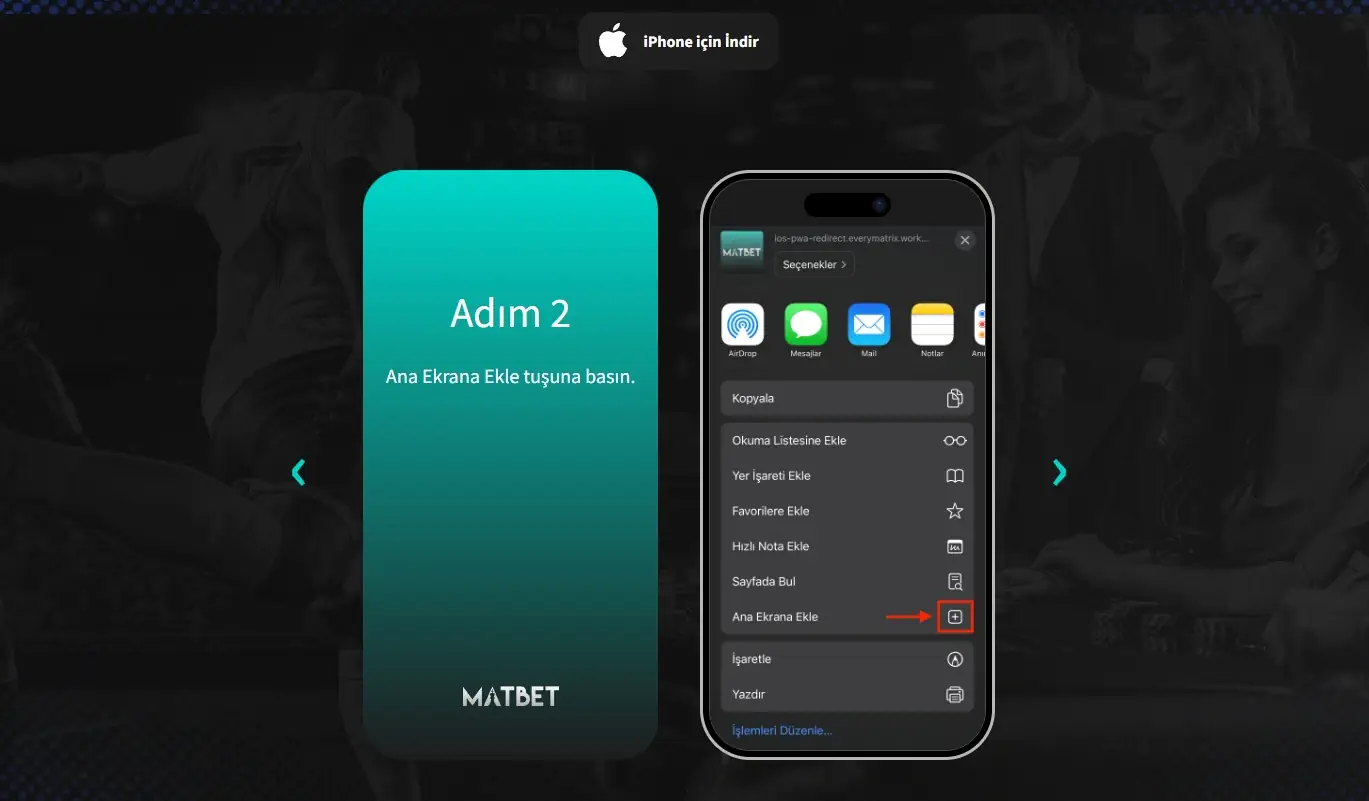
The operator's instructions use Turkish labels. The translations below help match them to Safari actions without changing their order.
| Label or action | Meaning in English | What to do |
|---|---|---|
| iPhone için indir | Download for iPhone | Open the offered iPhone route |
| Share | Share | Open Safari's actions menu |
| Ana Ekrana Ekle | Add to Home Screen | Choose to create a site icon |
| Ekle | Add | Confirm the action |
| MatBet icon | Launch the mobile interface | Tap after it appears on the home screen |
What the home screen icon does
The icon provides a separate launch point for the mobile interface. You can start from it without looking for an open tab among other Safari pages.
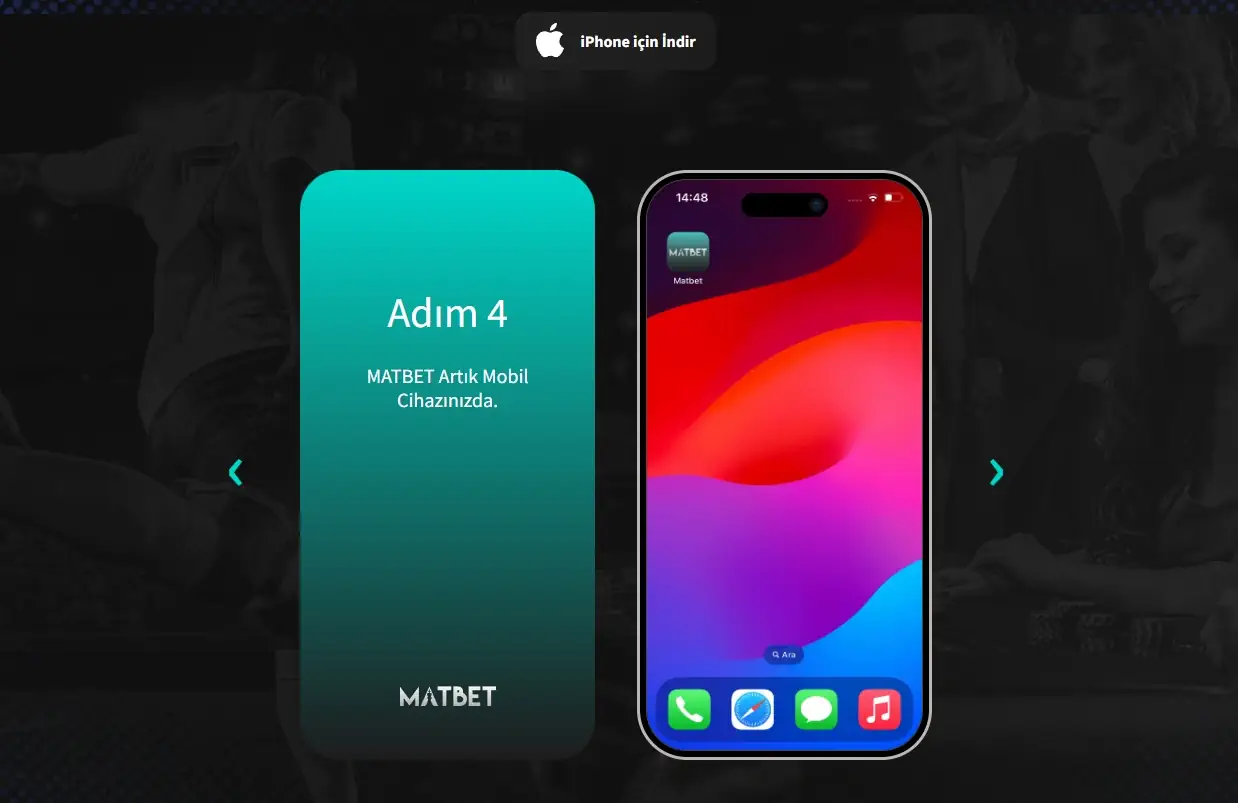
That is the main convenience when choosing an access method. If you prefer the service among your phone icons, add it to the home screen. If you visit occasionally, the browser page is enough.
Do not link the icon's appearance to account creation. Adding a site to your phone and registering are separate actions; the icon does not create a profile or replace login.
Do not expect it to work like an ordinary app from a store. An icon does not promise offline use, biometric login or notifications; each feature would need separate confirmation.
If the steps differ on your iPhone
If you see different steps after using the iPhone button, first check that the page is open in Safari and compare your screen with the expected step.
Stop where the steps diverge. Do not approve a device management profile or another unfamiliar action merely because a third-party page says it is required.
The described process uses the Share menu, Add to Home Screen and confirmation. Requests for other system changes are outside these steps.
If you cannot find the command, do not repeatedly follow different links. Tell support your device model, iOS version and the wording of the problem step. You can use the mobile site in the meantime.
Distinguish two outcomes: the icon appeared but the page will not open, or the icon was never added. The first concerns launching the page; the second concerns adding it. This detail helps describe the issue without guessing the cause.

MatBet app: can you open the service without installing it?
You do not need a separate app to access MatBet: the mobile site opens in an Android browser, in Safari on iPhone and on other compatible mobile devices.
This option works both for a first look and when you do not want a separate icon. Start with a current address from a verified channel.
Browser access does not promise that the service works in every country or on every phone configuration. The language of this page does not determine where it is available.
MatBet on your phone
How to check the source and access your account
Check the source before downloading a file or entering account details. To clarify the current route, use the operator's verified Telegram channel or MatBet support.
What to check before continuing
Check the channel, platform and proposed action. On Android, start with the Android button; the iPhone route adds the site through Safari.
Do not choose a file based only on its logo or matching name. Treat “new version” messages the same way: first establish that the operator offers the download through a current channel.
If a link unexpectedly asks for entirely different actions, clarify them before continuing. Save the warning text or screen name so you can describe the difference to support.
Login and registration after opening
After opening the mobile interface, use the separate guides for an existing account or registration: login and checking the current address and creating an account.
Do not create a new profile merely because you changed how you launch the site. First use the guide for logging in to your existing account.
When asking for help, state your platform, selected button and where the problem occurred. Do not include passwords or verification codes; hide personal and account details in screenshots.

Frequently asked questions about MatBet mobile access
Not for the method described here. Tap “iPhone için indir,” open Share in Safari, choose “Ana Ekrana Ekle” and confirm with “Ekle.” The icon launches the mobile web interface.
Use the download offered by the operator's current Android button. The historical filename matbet-release-1.3.1.apk is not a guide to the current release.
Yes. Open the mobile site in Safari. Adding it to the home screen creates a separate launch point and is not required for browser access.
Stop the download and ask support through a verified channel what the link is for. Do not install a file merely because its name or logo is familiar.
Adding an icon does not require a new account. Open the mobile interface and use the guide to logging in to your existing profile.
Which option to choose
For Android, use the operator's current button. On iPhone, add the site through Safari if you want a home screen icon. To access it without either step, choose the mobile browser.
If the offered route differs from the description, ask support for the current access method before downloading or installing.

Ryan Nece
Senior iGaming analyst
| Field | Value |
|---|---|
| Author | Ryan Nece |
| Role | Senior iGaming analyst |
| Experience | 6+ years analysing online casinos, payments, mobile apps and sports betting |
| Published | 6 October 2026 |
| Test device | Samsung Galaxy S25 FE |
| Methodology | How we review services |